
Here's a quick video to get you started.
✏️ Note: These workflows are suitable for a wide range of use cases, including onboarding, feedback collection, training, and recurring team processes.
Getting Started
-
In the Polly web dashboard, go to Workflows from the menu on the left
-
Click Create Workflow on the right-hand side
-
Select Custom Workflow
-
Give your workflow a title of your choice
Choosing a Trigger ⚡️
Select the Slash command trigger as shown in the screenshot. This trigger allows users to manually launch the workflow in Slack by entering a custom slash command, making it suitable for workflows that should run on demand.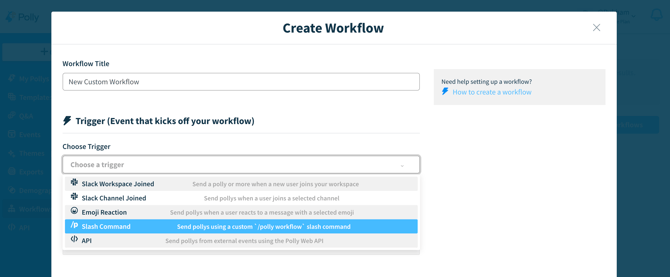
Choosing a Template and Sending Polly
From the Library Templates dropdown menu, you can choose from pre-built templates or select one of your own saved templates.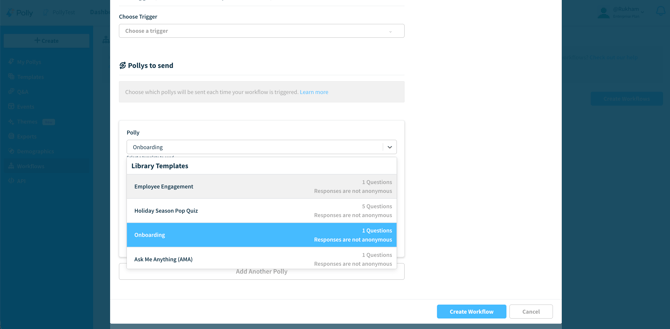
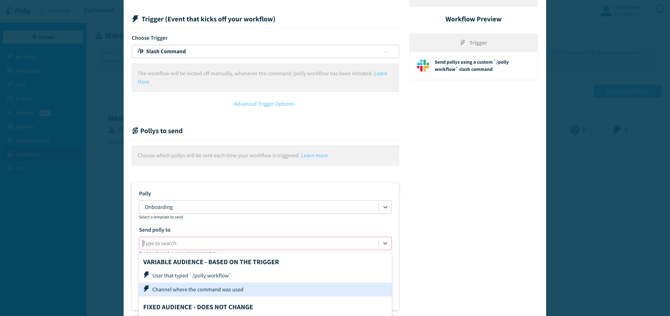
Once you have selected your template, use the next dropdown menu to choose the channel where the slash command will be available. This determines where users can run the workflow in Slack. You can limit the command to a specific channel or select Channel where the command was used to allow the workflow to run in whichever channel the slash command is entered.
💡 Tip: You can add as many Pollys as needed with different intervals, so workflows can evolve into multi-stage processes rather than one-off messages.
Setting Intervals
You can choose to send the message immediately when the trigger is met or delay delivery. By default, messages are sent as soon as the trigger occurs, but you can schedule them to be delivered a specified amount of time later. Delivery options include minutes, hours, days, weeks, or years after the trigger.
You can add multiple Pollys to a single workflow and schedule each one with a different delivery interval. This allows you to send multiple messages or questions over time.
💡 Tip: After running the slash command in the desired channel and selecting a workflow from the dropdown, you can enable a previously disabled workflow directly from Slack without returning to the Polly dashboard.