
Once set up, Polly handles the full experience end-to-end — from matching participants and proposing meetings to scheduling, conversation prompts, and follow-ups — so teams can focus on the conversations, not the coordination.
Watch a quick walkthrough of Polly Pairings below:
💡 Note: Polly Pairings requires two additional Slack permissions in order to function correctly within channels. You'll be prompted to approve these once Pairings is activated.
channels:join— allows Polly to automatically join public channels when Pairings is enabledmpim:write— allows Polly to create group DMs between matched participants for introductions and scheduling
How Polly Pairings works
After Polly Pairings is added to a channel, it runs on a recurring schedule based on your configuration.
On each cycle, Polly creates matches between participants in the channel and reaches out via Slack to coordinate the rest of the flow. Participants can review their match, choose whether to take part, and select a time that works for them.
From there, Polly continues to guide the experience by suggesting meeting times and sharing conversation starters ahead of the meeting.
Setting up Polly Pairings
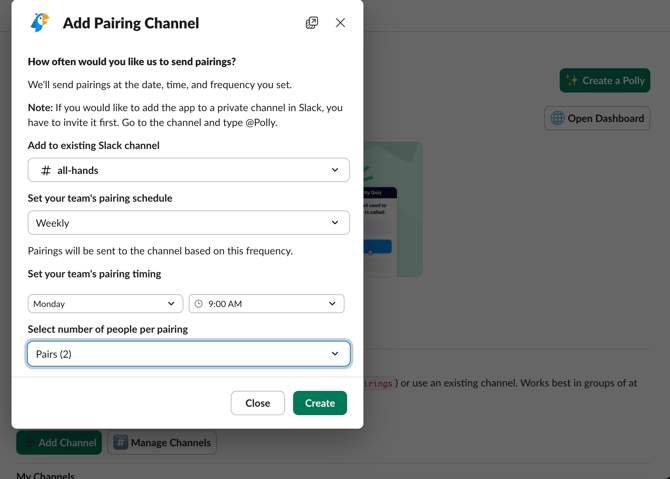
To get started, open the Polly app and navigate to the 👥Pairings section in the Home tab. From there, click Add channel to enable Polly Pairings in a Slack channel and configure how matches should run.
During setup, you’ll define:
- Channel — where you want Polly Pairings to run
- Cadence — how often pairings should be created
- Match day and time — when Polly should generate matches
- Group size — how many participants are included in each pairing
Once saved, Polly Pairings will begin running automatically on the selected schedule.
✏️ Note: For customers on the Enterprise tier, the ability to add Polly Pairings to a channel is available to Polly Admins. If you don’t have access, please reach out to your Slack / IT admin or contact Polly Support at contact@polly.ai.
Managing Polly Pairings
Once Polly Pairings is set up, you can manage it at any time from the Pairings section in the Polly Home tab.
From here, you can:
- View all channels where Polly Pairings is enabled
- Update configuration (cadence, timing, or group size)
- Remove Polly Pairings from a channel
✏️ Note: Polly Admins can manage Pairings across all channels where it has been enabled within the workspace.
Joining and profiles
When someone joins a channel with Polly Pairings enabled, they are automatically included in the matching pool.
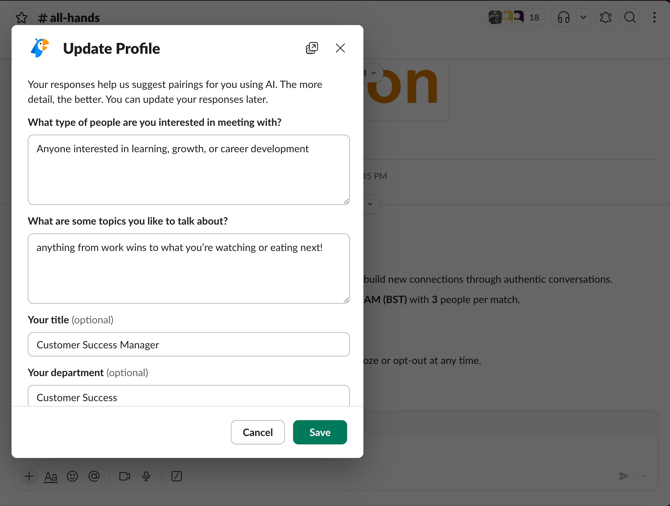
To improve match quality, Polly prompts users to complete a short profile. This includes things like interests, preferred conversation topics, and basic role or location details.
While profiles are optional, adding this information helps Polly create more relevant and engaging matches.
How matching works
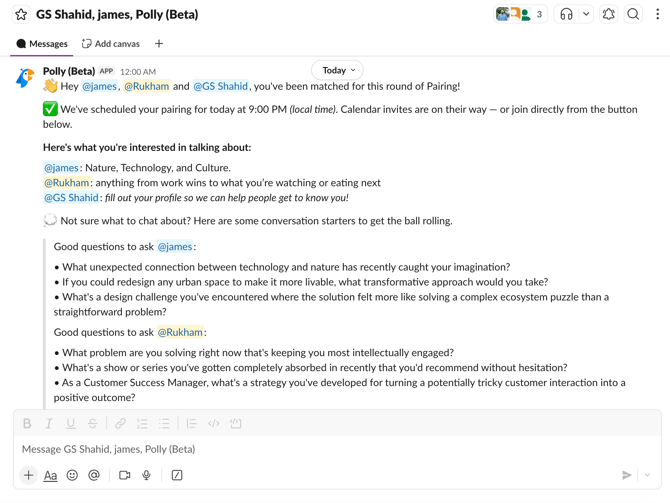
At the scheduled time, Polly creates matches and sends them to participants via a group direct message (DM) in Slack.
Each match appears as a dedicated chat including all participants, where Polly shares match details, scheduling information, and conversation starters.
When creating matches, Polly considers a few key factors to keep pairings both relevant and practical:
- Active participation
Only users who are currently active in the channel and have not snoozed or opted out are included. - Timezone compatibility
Matches are created between participants whose working hours reasonably overlap, making scheduling easier. - Previous pairings
Recent matches are avoided so participants are continuously introduced to new teammates over time. - Profile information (if available)
When profiles are completed, Polly uses shared interests and topics to help improve match relevance.
If profile information isn’t available, matches are still created using a randomized approach.
💡 Tip: Adding a mix of professional and personal interests helps Polly create more varied and engaging pairings.
Scheduling and Connecting your calendar
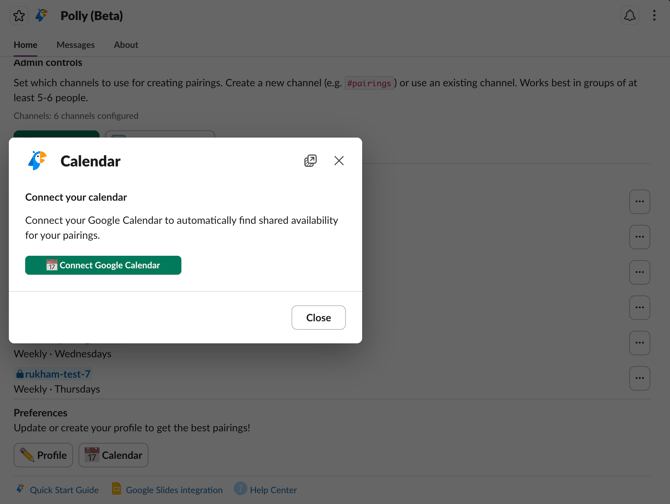
Once a match is confirmed, Polly helps coordinate a time that works for everyone. To make scheduling easier, you can connect your Google Calendar.
To connect your calendar:
- Open the Polly app from Slack
- Go to the Pairings section in the Home tab
- Under Preferences Click Calendar
- Complete the authorization flow
Once connected, Polly can:
- Check your availability when suggesting time slots
- Avoid scheduling conflicts
- Automatically create calendar events with meeting links
💡 Tip: Connecting Google Calendar is optional, but recommended for smoother scheduling and better availability matching.
Managing participation
Participants can control how they take part in Polly Pairings at any time.
💤 Snooze allows you to pause participation until a selected date, after which you’ll automatically be included again.
🚫 Opt out removes you from future matches for that channel until you choose to opt back in.
💡 Good to know
Here are a few helpful things to keep in mind when using Polly Pairings:
- Why a match may not be created
This can happen when there aren’t enough active participants, many users have snoozed or opted out, or there isn’t enough timezone overlap for scheduling. - Why a meeting may not get scheduled
Meetings require participant action. If a meeting wasn’t scheduled, it may be because someone declined, no time was selected, or there wasn’t shared availability. - Repeat pairings in smaller groups
Polly avoids recent pairings, but in smaller teams or channels with limited participants, repeat matches may still occur over time.
✏️ Note: On the Free plan, Pairings can be added to one Slack channel with support for up to 24 participants. If your channel exceeds this limit, Pairings will continue to function and participants won't be blocked automatically. Instead, you'll receive a notification that you've exceeded the Free plan limit and will have a 7-day grace period to upgrade before any action is required.