modal-close
Polly small logo

Login:

NEW · POLLY MCP SERVER

Ask AI. Then ask your team. Same conversation.

The Polly MCP server is live for Slackbot. Describe the poll, survey, or reminder you need in plain language — Polly drafts it, shows you a preview, and sends it to the right channel without you ever leaving the chat.
Enable MCP in Slack
Read the setup guide

Free to enable · Works with your existing Polly workspace

Web App Login Screen - MCP

Polly MCP in Slackbot — draft, send, and read results without leaving the chat.

WHY IT MATTERS

AI can answer a lot. Some questions
still need your team.

MCP lets Slackbot use Polly as a tool — so going from AI insight to human input
takes one sentence, not a detour into another workflow.

Chat

Ask in plain language

"Create a 5-question survey on onboarding." Polly handles question types, settings, and audience from a single sentence.

Visible

Preview before it sends

Every polly starts as a draft. Review the questions, adjust anonymity or timing, then approve — nothing goes out unconfirmed.

Feedback loop

Close the loop in chat

Pull results, refresh counts, and nudge non-responders from the same conversation — no dashboard hop, no thread hunting.

HOW IT WORKS

Live in two steps

If Polly is already in your workspace, you're most of the way there.

1

Enable the Slackbot connection

Open the Polly App Home in Slack and click Enable Slackbot to approve the mcp:connect scope. It's selected by default at install — if you skipped it, you can grant it anytime.

2

Start chatting

Open Slackbot and describe what you need. The first time Polly uses a tool, Slack asks you to confirm — choose Always allow so you're not prompted again.

SEE IT IN SLACK

Describe it. Polly drafts it. You approve it.

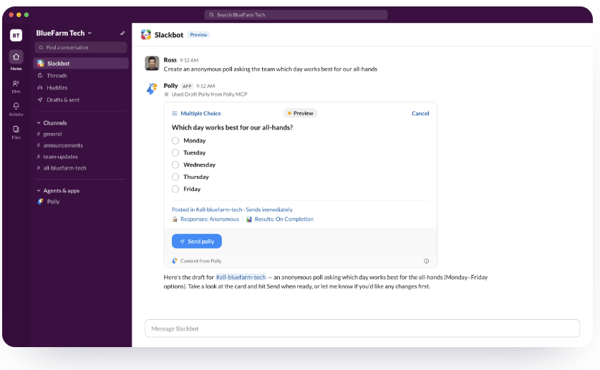
Slackbot passes your request to Polly, which builds the polly and returns a preview card —
question type, options, channel, anonymity, and timing all set from one sentence. Nothing sends until you hit Send polly.

Describe it. Polly drafts it. You approve it.

RESULTS IN THE SAME THREAD

Read the room without switching tools

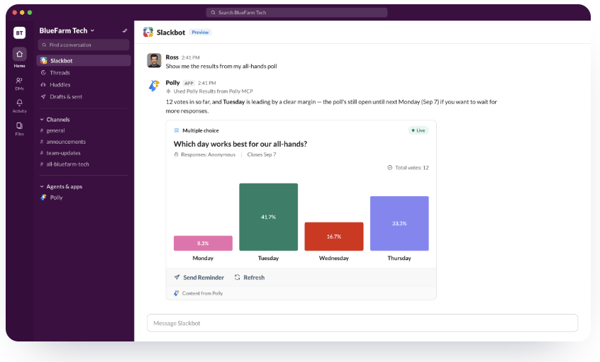
Ask for results and Polly returns a live card with counts and distribution —
plus one-tap actions to refresh or nudge whoever hasn't voted yet.

polly-mcp-2

WHAT YOU CAN ASK

Say it the way you'd say
it to a teammate

Create a 5-question multiple choice survey about our team's onboarding experience.

Run a quick pulse in #team-updates on how confident people feel about the launch.

Ask #product which of these three roadmap options should come first, anonymously.

Send a reminder to everyone who hasn't responded to the onboarding survey yet.

FULL CAPABILITY SET

Everything Slackbot can
do with Polly

Create, edit, close, reopen, and read — the whole polly lifecycle is available through MCP.

Polls & surveys

  • Draft — preview a poll or multi-question survey before sending. Always the first step.
  • Create — publish once you've confirmed the draft.
  • Update — edit a live or scheduled polly: question text, options, title, close time.

Lifecycle management

  • Close — end voting on an active poll or survey immediately.
  • Reopen — reopen a closed polly with a new close date.
  • Cancel draft — discard an unsent draft.
  • Send reminder — DM everyone who hasn't voted yet.

Reading & discovery

  • List pollys — browse with filters for status, channel, or date.
  • Get polly — fetch details for a specific poll or survey.
  • Get results — vote counts and distributions, shown as a card in Slack.
  • Search templates — Polly's built-in templates or your own saved ones.

GOOD TO KNOW

Frequently asked

What is the Polly MCP server?

blue arrow icon
MCP (Model Context Protocol) lets an AI assistant call real tools. The Polly MCP server makes Polly one of those tools — so an assistant can draft, send, and read pollys on your behalf. The Slackbot connector is live today; connectors for other assistants are on the way. 

Can the AI send something without my approval?

blue arrow icon
No. Drafting is always the first step. Polly shows you a preview with the questions and settings, and nothing is published until you confirm it.

Do I need a paid plan?

blue arrow icon
Enabling the connection is free. Certain Polly features may require a paid plan — if you ask for one that isn't in your current plan, you'll be prompted to upgrade.

I don't see the “Enable Slackbot” prompt.

blue arrow icon
The prompt only appears if the mcp:connect permission hasn't been granted yet — once approved it disappears from the App Home. You can also grant the scope directly.

Is my response data used to train AI?
blue arrow icon
Open-ended response content is not shared with the AI. Aggregate counts and distributions are what get returned when you ask for results.

Polly just got even easier in Slack. Our MCP server is live.

Try asking Slackbot a question only your team can answer. Polly takes it from there.

Polly MCP for Slackbot
modal-close Polly small logo

Add Polly to:

Slack
Zoom
Meet
Slides
Powerpoint
housecall-pro-white

Polly really reduced the amount of time and effort it takes to gather people data. It couldn’t be easier for me and our employees to use.

Rachel Faulkendar

Manager, People Operations

housecall-pro-white

Polly really reduced the amount of time and effort it takes to gather people data. It couldn’t be easier for me and our employees to use.

Rachel Faulkendar

Manager, People Operations