
Create a 5-question multiple choice survey about our team's onboarding experience.


Login:
What is the Polly MCP server?

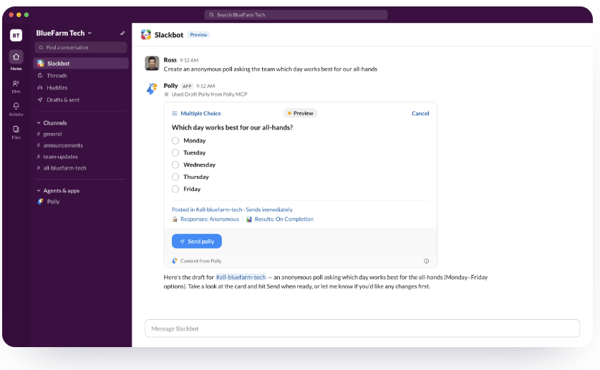
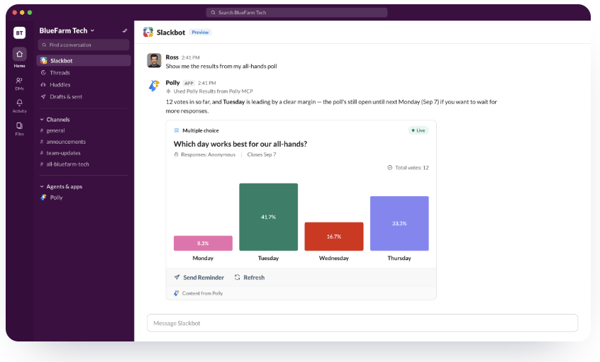
MCP (Model Context Protocol) lets an AI assistant call real tools. The Polly MCP server makes Polly one of those tools — so an assistant can draft, send, and read pollys on your behalf. The Slackbot connector is live today; connectors for other assistants are on the way.
Can the AI send something without my approval?
No. Drafting is always the first step. Polly shows you a preview with the questions and settings, and nothing is published until you confirm it.
Do I need a paid plan?
Enabling the connection is free. Certain Polly features may require a paid plan — if you ask for one that isn't in your current plan, you'll be prompted to upgrade.
I don't see the “Enable Slackbot” prompt.
The prompt only appears if the mcp:connect permission hasn't been granted yet — once approved it disappears from the App Home. You can also grant the scope directly.
Is my response data used to train AI?
Open-ended response content is not shared with the AI. Aggregate counts and distributions are what get returned when you ask for results.

Add Polly to:



Wildlife Studios
Implementing Polly at Wildlife was amazing. We really value the feedback from Wilders, because we believe they can help us build a better environment.
Branded Content
Wildlife Studios
Implementing Polly at Wildlife was amazing. We really value the feedback from Wilders, because we believe they can help us build a better environment.
Branded Content